
Estimate by User in Jira
— Without Sub-task Hell
Set individual time estimates for every team member directly inside a single Jira issue, sprint, or version
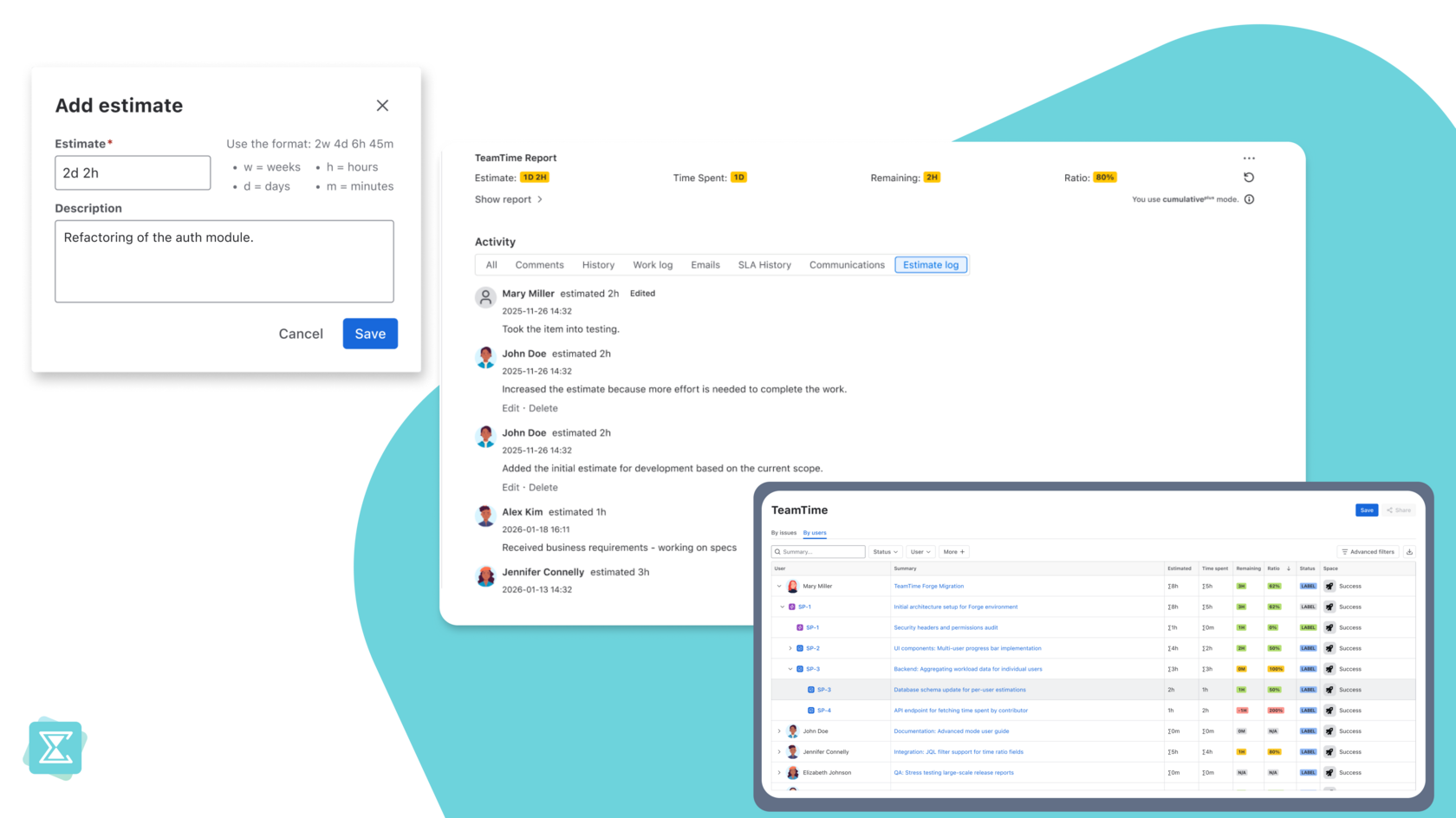
Jira Resource Planning
Made Simple
Native Jira Workflow acpects you to choose:
either one "Original Estimate" for the whole task or 10 sub-tasks just to assign time to different people
either one "Original Estimate" for the whole task or 10 sub-tasks just to assign time to different people

- TeamTime Advanced introduces a professional resource planning layer.
It treats Estimates with the same respect as Worklogs, allowing for a detailed breakdown of "Who"
is estimated to do "What" and for "How much time".
You can easily group data by users and or by work items to get the exact view you need.
Data-Driven Insights
at Your Fingertips
-
Distributed Estimation
Log your estimates for specific users just as easily as you log work. TeamTime automatically aggregates these inputs into a total issue estimate. -
Transparent Estimate Log
Keep a full history of your planning.
The Estimate Log shows exactly who estimated what and when, providing a "planning mirror" to your worklogs. -
Real-time Consumption Analysis:
Monitor the Ratio (percentage of the estimate consumed) and Remaining Time per user. Identify planning gaps by comparing Estimated Time vs. Time Spent in one grid.
Scalable Efficiency for Teams
- Resource Management:Plan hours across multiple Users to understand your team's total capacity without relying on manual spreadsheets.
- Project Transparency:Provide management with a granular breakdown of how the project budget is distributed across specific team members.
- Performance Reviews:Use historical data of Estimated vs. Spent time for objective team retrospectives and to improve future accuracy.
The Evolution of TeamTime
September 2026
September 2026
CumulativePlus: Per-User Estimates
Now available. Every contributor can log their own estimate on a shared ticket, with a full log of who added what and when.
Planned
for 2027
for 2027
Planned
for 2027
for 2027
Phase 2: Advanced Business Intelligence
Taking your planning to the financial level:
- Estimates by Roles: Plan by responsibility areas (Dev, QA, Design).
- Cost Projections: Translate time into budget based on user or role rates.
- Time in Status: Analyze workflow efficiency beyond manual worklogs.
- Story Points Support: Extending TeamTime into Agile velocity tracking.
New to TeamTime?
Install it from the Atlassian Marketplace — the trial includes Advanced.
Already on Standard?
Start your free 30-day Advanced trial right from Settings → Apps → Manage apps → TeamTime → Try Advanced.
Not sure it's the right fit? Email us: support@teamlead.one.
Install it from the Atlassian Marketplace — the trial includes Advanced.
Already on Standard?
Start your free 30-day Advanced trial right from Settings → Apps → Manage apps → TeamTime → Try Advanced.
Not sure it's the right fit? Email us: support@teamlead.one.
Stay Informed & Shape the Roadmap
Leave your email to hear about what's next for TeamTime — new capabilities, roadmap updates, and early access opportunities
Want a say in what we build next? Opt in below, and we'll occasionally reach out with roadmap updates — and the chance to share your feedback
Want a say in what we build next? Opt in below, and we'll occasionally reach out with roadmap updates — and the chance to share your feedback
By clicking the button, you agree to receive product updates, news, and exclusive offers from the Teamlead team, Privacy Policy
Explore More Ways to Optimize Jira
TeamTime is part of a broader solution designed to make Jira work for you,
not the other way around
not the other way around
-
-
Calendar for Jira
Get a 360° view of your projects: from visual scheduling in Calendar to deep worklog analysis in TeamTime -
Consulting Services
Have a complex reporting challenge? Our experts are ready to help you configure TeamTime for your specific business needs or discuss custom feature requests -
TeamTime Knowledge Base
Learn how to master Forge-based reporting with our step-by-step guides and best practices